
The best 5070 ti card is not automatically the one with the biggest cooler, the most RGB, or the longest name on the box. I have watched plenty of builders spend extra money on three fans and decorative metal, then put the card in a case with terrible airflow. That is backward. A good RTX 5070 Ti should deliver steady performance, reasonable noise, and a cooler that does not turn your case into a Houston garage in July.
This is the shortlist I would use when planning a new gaming PC: ASUS TUF Gaming, MSI Gaming Trio, Gigabyte Gaming OC, and PNY XLR8. The right choice depends on the case, power supply, monitor, and price you find. The GPU matters, but the cooler and installation details decide whether you enjoy owning it.
What separates a good 5070 Ti from a bad one
Most RTX 5070 Ti cards use the same underlying GPU, so do not expect a premium model to transform frame rates. The differences are usually found in cooling hardware, factory power limits, fan behavior, dimensions, warranty support, and price. A faster factory boost setting is useful, but it is rarely worth paying a large premium by itself.
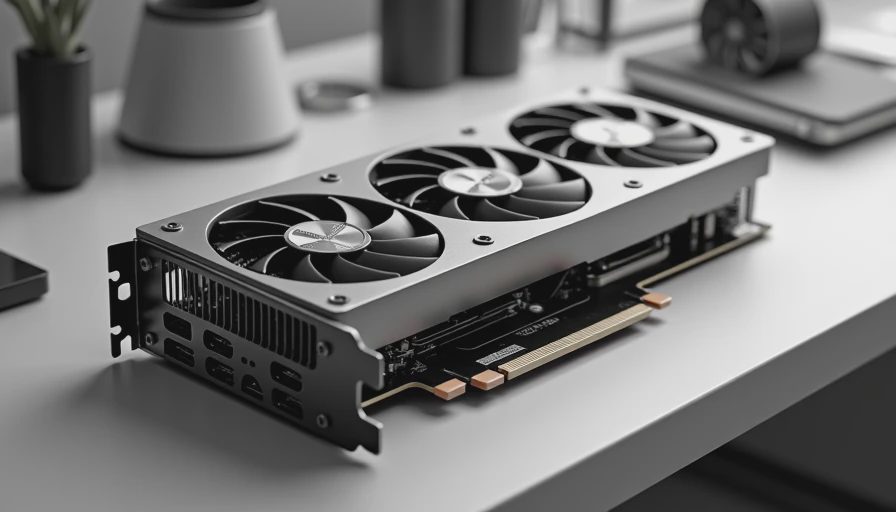
For the best 5070 ti card, I would first check the cooler. Look for a substantial heatsink, multiple heat pipes, and fans that can stop at low temperatures. A card that idles quietly and ramps smoothly during a game is easier to live with than one that constantly surges from silent to vacuum cleaner. I also want a rigid backplate, a sensible power connector position, and enough clearance around the connectors to avoid sharply bending the cable.
Do not ignore thickness. A three-slot card can cover expansion slots, interfere with a bottom intake fan, or leave almost no room for a capture card. Measure from the motherboard slot to the side panel, not just from the product page's maximum length. Manufacturers list dimensions differently, and that small detail has caused more than one expensive return on my workbench.

My preferred models for most builds
The ASUS TUF Gaming version is usually the safe, boring answer, and I mean that as praise. Its cooler is built for sustained gaming rather than a five-minute benchmark screenshot. It tends to make sense in a midrange or high-end case with decent front-to-back airflow. The best 5070 ti card for a quiet workstation-and-gaming build is often a model like this, provided its price is not inflated.
MSI's Gaming Trio line is another strong candidate when the case has room. The cooler is large, which helps keep fan speed under control, but that size can become a problem in compact cases. Measure both card length and thickness. If you are building in a Fractal Design North, Corsair 4000D Airflow, or similar roomy chassis, this type of card is easier to justify than in a small-form-factor enclosure.
Gigabyte Gaming OC models are worth watching when a retailer prices them below the better-known alternatives. A sensible price difference can matter more than a tiny factory overclock. I would rather put that money toward a reliable 850-watt power supply, two quality case fans, or a larger SSD. PNY XLR8 cards can also be appealing for straightforward builds where the physical dimensions and warranty terms fit your plan.
Cooling, noise, and the case you already own
A premium GPU cooler cannot rescue a case with no usable airflow. Set up at least two front intake fans and one rear exhaust fan, then keep dust filters reasonably clean. In a warm room, the air entering the case matters more than an extra strip of lighting. That is not glamorous advice, but it works.
The best 5070 ti card for a compact case may not be the best model on a comparison chart. A shorter dual-fan card can be the smarter purchase if it leaves space for airflow and does not block the front radiator. On the other hand, a large triple-fan design generally gives you more thermal headroom in a spacious tower. The correct cooler is the one that fits without strangling the rest of the machine.
Undervolting is also worth considering. Modern GPUs can often maintain nearly the same gaming experience with less power and heat when tuned carefully. Start conservatively, test several demanding games, and watch for crashes or visual artifacts. Do not copy a random voltage curve and assume it is stable. Stability testing is cheaper than troubleshooting a black screen six months later.
Power supply and connector checks
Pair the card with a reputable ATX 3.0 or ATX 3.1 power supply from a known manufacturer. Seasonic, Corsair, be quiet!, Super Flower, and similar established brands have models worth considering, but judge the exact unit rather than trusting the logo alone. An 850-watt supply is a comfortable target for many builds using a 5070 Ti and a modern desktop processor. A lower-wattage unit can work in the right system, but leave room for startup spikes and future upgrades.
Use the power cable supplied with the power supply when possible. Seat the connector fully, and avoid a sharp bend right at the plug. The best 5070 ti card cannot compensate for a loose connector or a cable pressed hard against the side panel. Finish cable management after confirming the plug is completely inserted and the system has passed a long gaming session.
How I would choose by budget
If two cards are within a small amount of each other, buy the one with the better cooler, clearer warranty process, and dimensions that suit your case. If one premium model costs substantially more, ask what you are gaining. A quieter heatsink can be worth the difference for a bedroom PC. A factory overclock alone usually is not.
The best 5070 ti card at a discount is often more sensible than a supposedly superior model selling well above normal pricing. Watch reputable retailers, compare return policies, and avoid marketplace listings with unclear seller information. A deal is not a deal if the card arrives used, damaged, or impossible to return.
Remember the rest of the build. A fast GPU paired with an old four-core processor can leave performance on the table at lower resolutions. For 1440p gaming, balance the processor, memory capacity, monitor refresh rate, and storage speed. Spending every dollar on the graphics card and then using a cheap power supply is a classic garage mistake.
My final buying checklist
Before ordering the best 5070 ti card for your machine, measure the card length, height, and thickness against the case specifications. Confirm that the power supply has the correct connector and enough capacity. Check whether the card blocks neighboring slots or a front radiator. Read the warranty terms, verify the return window, and compare the total price after shipping.
Then decide what matters most. Choose ASUS TUF or MSI Gaming Trio when quiet cooling and a roomy case are priorities. Look at Gigabyte Gaming OC or PNY XLR8 when the price and dimensions are better. Skip any model that requires compromises you will notice every day, such as blocked airflow or an awkward cable bend.
My practical answer is simple: buy the coolest, quietest, properly sized card from a reputable seller at a sane price. Do not pay for RGB theater. I turn it on so you do not have to; now measure your case, check your power supply, and make the purchase that fits the machine you are actually building.